
Introduction
TIPT-over-the-Internet, or TOTI allows standard Polycom TIPT handsets to be connected and used for business telephony at any location with suitable internet access.
These handsets rely on both data/internet access, and general power, to operate.
This guide sets out the minimum operating requirements for TIPT-over-the-Internet
Minimum Requirements
- Sufficient internet speed and capacity
Allow 10mbps download and 1mbps upload per handset, or per concurrent call, in addition to a minimum of 10mbps/1mbps for general connectivity.
Eg, a site with one handset requires a minimum of 20mbps download, and 2mbps upload. A site with four handsets, where there are only expected to be two calls at a time, requires 30mbps download, and 3mbps upload.
Check your speed by using an internet 'speed test' tool like Ookla. - A network router with at least one ethernet port. This should be supplied by your ISP, or IT Professional
- A TIPT-over-the-Internet enabled Polycom VVX 411 handset, supplied and configured by CAS ICT.
- Third party handsets, or handsets not supplied by CAS ICT cannot be used.
- An Ethernet Power-over-Ethernet (POE) injector OR a Polycom VVX 411 handset power supply). These will be supplied by CAS ICT
- (OPTIONAL) Larger sites may opt to utilise a POE-capable network switch.
- Sufficient internal 'structured' network cabling, or ethernet leads, to carry network traffic from the router to the phone handset locations.
Physical Handset Setup
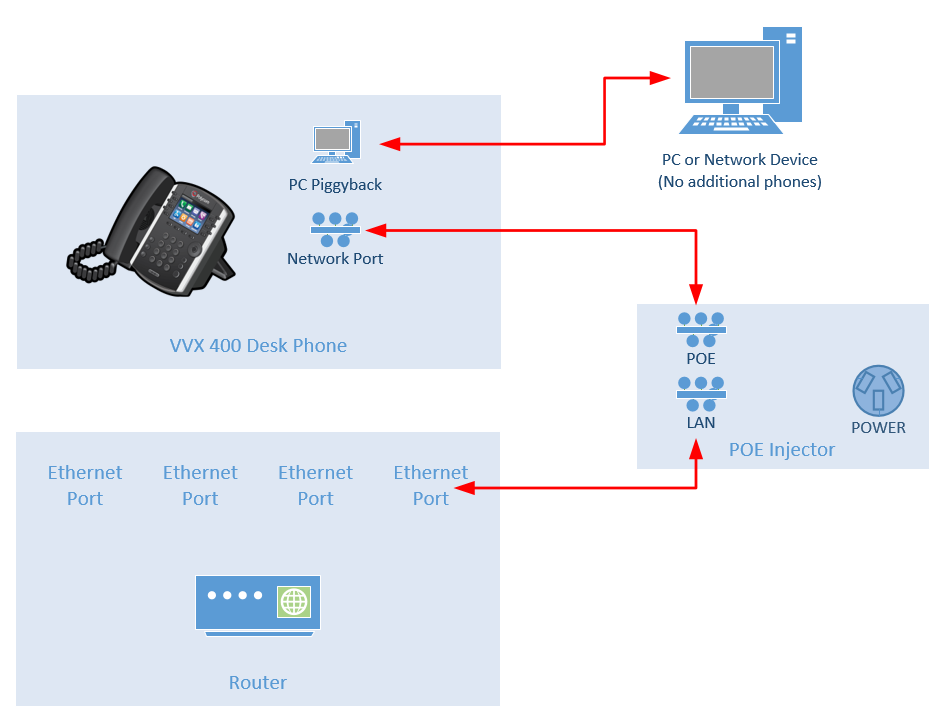
Generally, the handset must be connected via ethernet cable, to the router, with the power for the handset supplied by an 'in-line' power injector, or by a handset power pack,
The below diagram shows the typical layout for a setup including an in-line POE Injector
Piggyback Connections
Polycom VVX 400-series handsets include a 'piggyback' or auxiliary port on the back of the phone, to which another network device can be connected.
This network device receives the same network connection and traffic as is made available to the phone handset, and can be a convenient method to connect a PC or network device if another network port is not conveniently available.
Please note, that a second phone handset cannot be connected to this port (daisy-chained).
Troubleshooting
Refer to the following quick troubleshooting steps in case of fault, prior to contacting the CAS ICT Helpdesk.
- The phone handset is 'dead', with no lights, volume, or calls working.
- Check all cable connections, including the power supply. Ensure all plugs are correctly inserted and oriented according to the setup diagram. Compare to a working phone
- The phone is 'alive' but will not make or receive calls. A PC connected to the piggyback port also has no internet connection.
- Confirm internet connectivity at the router. Check using Wi-Fi to ensure that your internet is online and stable
- Confirm the cable between the router and the POE Injector has not become disconnected or damaged.
- Switch POE injectors and cables with another known-good handset to test for a faulty component
- The phone is alive, but calls are unstable, or dropping out.
- Check internet speed and stability is sufficient to support TIPT-over-the-Internet
Comments
0 comments
Please sign in to leave a comment.